Some links on this page are affiliate links. If you buy through them we may earn a commission at no extra cost to you. How we stay independent.
Quick answer
- DIY 4G solar cameras cost roughly $150–400 each plus a data plan, and suit small residential jobs.
- Mobile solar surveillance trailers typically rent for about $400–1,500+ a month, more with live monitoring (typical US ranges, late 2026).
- Watch the material laydown area, equipment parking, entry gates and anything with copper wire first.
- Deterrence (signs, lights, sirens, talk-down) prevents more loss than recordings do.
- Plan to move cameras as the site evolves, and budget data for each 4G camera.
Why job sites need temporary, self-powered cameras
Construction sites are hard to secure. They change week to week, they are often empty at night and on weekends, and they hold exactly what thieves want: tools, copper, lumber, appliances waiting to be installed and equipment that can be driven away. Permanent power and internet usually arrive near the end of the job, long after the risk peaks.
That makes solar the natural fit. A solar powered security camera for construction site work needs no temporary power drop, no generator and no cable runs across a muddy site. It goes up on day one and moves when the site changes. For background on how these cameras manage power, see how solar cameras work.
Option 1: DIY 4G solar cameras
A DIY setup uses consumer or prosumer 4G LTE solar cameras, each with its own panel, battery, SIM card and microSD card. You mount them on temporary fence posts, scaffolding, a power pole or a timber post set in the ground, and view them from your phone.
Pros
- Low upfront cost, roughly $150–400 per camera (typical US retail)
- No monthly fee beyond data, often $5–25 per camera
- Easy to move as the site changes
- Reusable on the next job
Cons
- Motion clips, not continuous 24/7 recording
- Nobody watching live unless you are
- Small cameras are easy to steal or vandalize
- Battery limits in winter and heavy-activity zones
A DIY solar security camera for construction site use suits small residential builds, renovations, single-lot jobs and contractors who want to check a site from the truck. Our solar CCTV camera with SIM card review explains what to look for in a cellular model.
Option 2: Mobile solar surveillance trailers
A mobile solar surveillance trailer is a towable unit with a telescoping mast (often 15–30 ft), several cameras (fixed and PTZ), a large solar array, a battery bank, often a backup generator, and a cellular router. They record continuously, cover a much wider area, and usually come with remote monitoring, lights, speakers and sirens.
Most contractors rent rather than buy. Pricing varies a lot by region, contract length and whether live monitoring is included. The ranges below are typical US figures at time of writing (late 2026), not quotes.
| Arrangement | Typical cost | What is usually included |
|---|---|---|
| Trailer rental, self-monitored | ~$400–1,000 / month | Trailer, cameras, cellular connection, app access, recorded video |
| Trailer rental with live/remote monitoring | ~$800–2,500+ / month | All of the above plus operators responding to alerts, talk-down, police dispatch |
| Delivery and pickup | ~$100–500 each way | Depends on distance |
| Purchase | ~$10,000–40,000+ | For firms with many sites; monitoring extra |
Ask what happens when the trailer itself is damaged, who pays for data overages, how long footage is kept, and what response time monitoring includes. Contract terms often have minimum periods.
DIY cameras vs trailer: which fits your job?
| Factor | DIY 4G solar cameras | Surveillance trailer |
|---|---|---|
| Site size | Single lot, small commercial | Large commercial, multi-acre, infrastructure |
| Recording | Motion-triggered clips | Continuous 24/7, plus events |
| Monitoring | You, via phone alerts | Optional professional monitoring |
| Deterrence | Small, sometimes a siren or light | Very visible mast, lights, speakers |
| Upfront cost | $300–1,600 for 2–4 cameras | None if rented |
| Monthly cost | $10–100 in data | $400–2,500+ rental |
| Setup | An hour or two | Delivered and positioned |
Many builders combine them: a trailer covering the main yard and gate, and a couple of DIY cameras in spots the mast cannot see, such as inside a building once it is closed in.
What to watch on a construction site
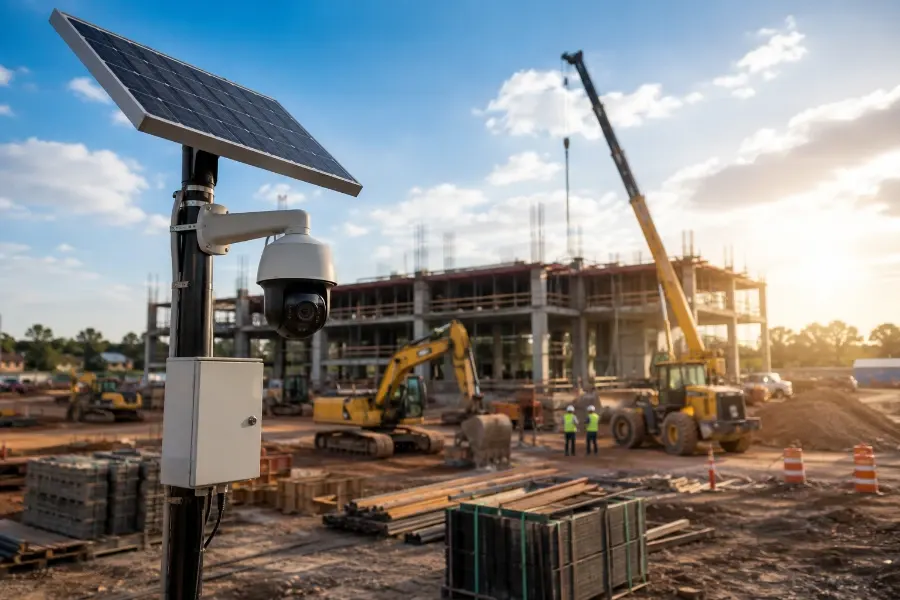
A temporary security camera for a job site should cover the places where loss happens, not just give a pretty overview. In order of priority:
- Entry gates. Every vehicle comes through here. Frame for license plates and faces. Our solar gate camera guide covers angles.
- Material laydown areas. Lumber, rebar, roofing, pipe and drywall. Big losses come from a truck loaded overnight.
- Copper wire and electrical supplies. Spools of wire and installed copper are prime targets. If wire is stored in a connex box, watch the doors.
- Equipment parking. Skid steers, mini excavators, generators, light towers and trailers. Note that GPS trackers on equipment complement cameras well.
- Tool storage. Job boxes and containers. A camera on the door catches the break-in in progress.
- Buildings once closed in. Appliances, HVAC units, fixtures and installed wire are taken from inside nearly finished homes.
To estimate how many cameras the layout needs, try the CCTV camera planner. To check what each camera can actually identify at a distance, use the camera coverage calculator.
Deterrence: signs, lights, sirens and talk-down
A recording of a theft helps with insurance and police reports, but it rarely brings materials back. The real goal is to make thieves skip your site.
- Signage. "24-hour video surveillance" signs at every gate and along the fence. Cheap and effective with opportunists.
- Lighting. Motion-activated solar floodlights at the gate and laydown area. Light also gives the camera color video instead of grayscale infrared.
- Sirens and strobes. Many 4G cameras and all trailers have them. They make an intruder feel noticed even on a remote site.
- Talk-down. A live voice saying "you are being recorded, police have been called" from a speaker is one of the most effective deterrents. Self-monitored cameras with two-way audio let you do this from your phone; monitored trailers have operators who do it for you.
- Visible cameras. A mast on a trailer is obvious from the road. That is the point.
Two-way talk is generally fine, but recording conversations is subject to wiretap and consent laws in many states. Video of your own site is generally allowed; avoid pointing cameras into neighboring homes. Check your state rules, and see the FTC’s privacy and security guidance for general business obligations around collected data.
Construction site CCTV solar placement and mounting
Mount construction site CCTV solar cameras high and solid. Temporary fence panels shake in the wind, which produces blurry footage and false motion alerts, so use the fence posts at the end of a run or brace them. Better options:
- Use a dedicated post
A 4x4 or 4x6 timber or steel post set in the ground or bolted to a heavy base gives a stable 3–4 m mount.
- Use existing structures
Temporary power poles, scaffolding and the building frame work once they are up. Clamp mounts avoid drilling into finished materials.
- Keep the panel in sun
As walls rise, a camera that had full sun in week one may be shaded by week six. Check the panel’s view of the southern sky regularly. Our site check tool helps.
- Lock it down
Security screws, a lock box or cage, and enough height that the camera cannot be reached from the ground or a truck bed.
For general mounting technique, see our solar camera installation guide.
How to set up a solar security camera for construction site use
Setting up a DIY solar security camera for construction site coverage takes an afternoon if you prepare. Do as much as possible before you get to the site.
- Activate the SIM and set up the camera at the office
Insert the SIM and microSD card, charge the battery fully, add the camera to your app and update firmware while you have a good signal and a desk. Fumbling with activation on a muddy site wastes time.
- Walk the site and check signal
Use a phone on the same carrier at each planned mounting spot. Steel framing and concrete can weaken signal near the structure, so test at the actual height.
- Mount and aim
Fix the camera 3–4 m up, angled down at the target area. Face the panel true south (in the northern hemisphere) at a tilt close to your latitude; the solar panel angle calculator gives exact numbers.
- Set detection zones and schedules
Draw activity zones around the gate and materials, exclude the street, and schedule full alerts for after hours.
- Test from the truck
Walk through the view while a colleague watches the app. Confirm alerts arrive and the footage identifies a person at the distance that matters.
- Share access
Add the site superintendent and anyone who might respond after hours so alerts reach someone who can act.
Common mistakes with temporary job-site cameras
- Mounting on loose fence panels. Wind shake triggers constant motion alerts and drains the battery.
- Watching the work area all day. Hundreds of daytime triggers empty the battery and the data plan. Schedule around working hours.
- Forgetting shading as walls go up. The panel that had full sun at the slab stage may be in shadow by framing.
- No signage. A camera nobody knows about records the theft; a sign may prevent it.
- Relying only on the microSD card. A stolen camera takes its card with it. Make sure clips upload as they are recorded.
- Leaving cameras behind at handover. Build removal into the closeout checklist so equipment comes back for the next job.
Moving cameras as the site evolves
A building site changes shape constantly. The laydown area moves, the gate shifts, and the structure itself starts blocking views and sun. Plan for it:
- Foundation and framing: open site, wide views. Cover the gate, materials and equipment.
- Dry-in and rough-in: copper wire, plumbing and HVAC equipment arrive. Add a camera on the building entry and the electrical storage.
- Finishes: appliances and fixtures inside. Move a camera indoors (with its panel outside on a cable) or add an indoor camera once temporary power is in.
- Handover: remove cameras and reset them before the next job. Our reset guide covers the process.
Review camera positions at each phase meeting. Moving a solar camera is a 15-minute job; discovering a blind spot after a theft is expensive.
Data plans for job-site cameras
Every 4G camera needs its own SIM and data plan. Usage depends on how busy the camera’s view is and how often you watch live. A camera on a quiet gate overnight might use 1–3 GB a month; one watching a busy laydown area during working hours, with frequent live checks, can use 10 GB or more.
Two settings make the biggest difference: limit recording to after hours (many cameras support schedules), and keep live view short. Use the calculator below to estimate monthly data and how many days of footage your microSD card will hold.
Some carriers offer pooled data plans for business lines, which smooth out the variation between a busy camera and a quiet one. Check that the plan allows IoT or camera use; some consumer plans prohibit it.
Power planning on a job site
Daytime activity on a construction site is heavy, so a motion-triggered camera can wake hundreds of times a day if it watches the work area. That drains the battery faster than the panel can refill it, especially in winter with 2–3 peak sun hours in northern states. Set schedules or activity zones so the camera focuses on nights and weekends. If you need daytime coverage too, pick a camera with a larger external panel and check the numbers in the solar camera battery calculator.
Recommended gear
Reolink Go PT Ultra + Solar Panel 2
- 4K
- 4G LTE (nano SIM)
- Pan & tilt
- 6 W panel
- microSD
Cellular pan-tilt camera for farms, gates and job sites with no Wi‑Fi. Needs a data plan on a supported carrier.
View on AmazonAnti-theft security mount
- Lockable bracket
- Security screws
- Tether options
Makes a battery camera much harder to twist off and walk away with: worth it at gates and job sites.
View on AmazonVideo surveillance warning signs
- Reflective aluminum
- Weatherproof
- Pre-drilled
Cheap deterrent that also helps meet notice rules on rental and commercial property.
View on AmazonSolar motion flood light
- Motion activated
- Separate solar panel
- No wiring
Lights the scene so night footage switches to color and intruders know they are seen.
View on AmazonAffiliate links. Prices, bundles and specs change, so confirm compatibility on the listing.
Insurance considerations
Builder’s risk and contractor’s equipment policies sometimes ask about site security, and some insurers ask for or reward measures such as fencing, lighting and cameras. Whether a camera system lowers your premium depends on the insurer and the policy, so ask your agent directly. A few practical points:
- Keep footage long enough to cover the claim window. Download and save clips of any incident immediately.
- Log serial numbers of tools and equipment, and photograph material deliveries. Footage is far more useful alongside an inventory.
- Check whether the policy requires security measures to be in place and working. A camera with a dead battery may not satisfy that.
- Know your deductible. For small thefts below it, deterrence is what saves money.
If you are weighing solar against a temporary power drop for cameras, our solar vs wired comparison breaks down the trade-offs.
Frequently asked questions
How much does a construction site security camera cost?
DIY 4G solar cameras typically cost about $150–400 each plus $5–25 a month for data. Mobile solar surveillance trailers usually rent for roughly $400–1,000 a month self-monitored, or $800–2,500+ with live monitoring, plus delivery. These are typical US ranges in late 2026; get quotes for your area.
Do construction site cameras need Wi-Fi?
No. Job sites rarely have Wi-Fi, so most temporary cameras use 4G LTE with a SIM card. Check that the site has a usable cellular signal at the mounting height before you commit, and choose cameras with microSD recording so they keep footage if the connection drops.
Is a solar surveillance trailer worth renting?
For larger commercial sites with valuable equipment and materials, often yes. Trailers record continuously, cover wide areas from a tall mast, and usually include lights, speakers and optional live monitoring. For a small residential job, two or three DIY 4G solar cameras often give enough coverage for far less.
What should I point my job site cameras at?
Prioritize the entry gate for vehicles and plates, material laydown areas, equipment parking, tool containers and any stored copper wire. Once the building is closed in, cover entrances and the areas where appliances and fixtures are stored. Wide overview shots rarely identify anyone.
Can solar cameras record 24/7 on a construction site?
Most battery solar cameras record motion clips only, because continuous recording uses far more power than a small panel provides. Surveillance trailers have large arrays and battery banks and can record 24/7. If you need continuous recording from DIY cameras, you need temporary mains power or a much larger solar system.
Will security cameras lower my builder’s risk insurance?
It depends on the insurer and policy. Some insurers ask about site security or reward measures like fencing, lighting and monitored cameras, while others do not adjust premiums. Ask your agent, and check whether the policy requires specific security measures to be in place.